Check out the Fabric Data Days (English) | Microsoft Reactor , and claim the DP-600 or DP-700 exam voucher free: Fabric Data Days | Get Certified - Microsoft Fabric Community
Posts
RDP can't connect to remote host with Credssp-encryption error
If the Server is not upgraded, upgraded client will not able to connect. In this case, you can set the registry to allow unsecured connections: Run the following command to add a registry value: REG ADD HKLM\Software\Microsoft\Windows\CurrentVersion\Policies\System\CredSSP\Parameters\ /v AllowEncryptionOracle /t REG_DWORD /d 2 https://support.microsoft.com/en-us/help/4295591/credssp-encryption-oracle-remediation-error-when-to-rdp-to-azure-vm
Unable to initialize the Shared Memory listener. Access is denied
SQL Server failed to start Run SQL Server from command line and shows this error: Unable to initialize the Shared Memory listener. Access is denied Cause: When the SQL Server starts it tries to open listening named-pipes to accept client share memory or named-pipe connections. If the listening named-pipes are not closed properly during the last shutdown of SQL Server (maybe after a forced kill of the SQL Server process), there will be orphan named-pipe handles in the windows kernel file system. To solve this issue, a quick solution will be to reboot the host machine.
SQL Server 2017 Installation Issue - VS Shell installation has failed with exit code 1638
Tried to install SQL Server on a new laptop and ran into this issue of unable to install VS shell. Followed this link to uninstall C++ runtime 2017 first and then SQL Server installation succeeded. https://dba.stackexchange.com/questions/190090/help-installing-sql-server-2017-vs-shell-installation-has-failed-with-exit-cod Remember to reinstall the C++ run time 2017 afterwards, so that VS2017 still works.
Devops with VSTS series video
https://blogs.msdn.microsoft.com/devops/2017/11/22/devops-and-vsts-videos-from-connect-2017/?utm_source=vs_developer_news&utm_medium=referral
SSRS issue on SQL Server 2012 SP3 -The version of the report server database is either in a format that is not valid, or it cannot be read
When windows update pushed SQL Server 2012 SP3 to the database server on the weekend, we received an error on SSRS: "The version of the report server database is either in a format that is not valid, or it cannot be read." I googled around and found this post on TechNet: https://social.technet.microsoft.com/wiki/contents/articles/32360.sspr-troubleshooting-the-version-of-the-report-server-database-is-either-in-a-format-that-is-not-valid-or-it-cannot-be-read.aspx I was surprised that a major SP would contain such an issue as most IT shops won't bother with the many CUs and choose to stay with SPs. The fix is upgrade to SP3 CU6 for us. Microsoft recommends to go with the latest CU, which is CU9. List of SQL Server Versions for reference: http://sqlserverbuilds.blogspot.ca/
Move TFS Database to another SQL Instance
Some high level steps involved in moving TFS Database to another instance. Tuesday, March 28, 2017 3:13 PM iisreset /stop TfsServiceControl.exe quiesce tfsconfig remapdbs /databasename:{TFSServerName}\{SQLInstanceName};Tfs_Configuration /SQLInstances:{TFSServerName}\{SQLInstanceName} /AnalysisInstance:{TFSServerName}\{SQLInstanceName} /AnalysisDatabaseName:TFS_Analysis tfsconfig repairjobqueueTFSCOnfig Accounts /ResetOwner /SQLInstance:{TFSServerName}\{SQLInstanceName} /DatabaseName:TFS_Configuration TFSCOnfig Accounts /ResetOwner /SQLInstance:{TFSServerName}\{SQLInstanceName} /DatabaseName:TFS_Configuration TFSConfig RegisterDB /SQLInstance:{TFSServerName}\{SQLInstanceName} /databaseName:TFS_Configuration IISReset TFSServiceControl unquiesce
SQL Server Management Studio Start Debug Error: coloader80.dll
I got this error complains the coloader80.dll was not installed properly every time I install a new version of Visual Studio. The dll is in the IDE folder, so all I need to do is re-register the dll from the latest version of VS. C:\Program Files (x86)\Microsoft Visual Studio 14.0\Common7\IDE>regsvr32 coloader80.dll
Parse HTML code and save formatted text to Excel cell
I created a TFS hierarchical style report to show User Stories Test Cases The report works well, however it lists the Test Step in HTML format. When I export the report to Excel through VS, the HTML is not displayed in user friendly format. I started to google around for solutions, and these are the steps: Select the HTML and send to clipboard Paste back to Excel with "Paste Special" to preserve the format When paste multiple lines of text, excel puts them in multiple rows, and the vba collects all the rows and puts them back to one row These are the protocol code: Private Sub Convert_Click() Dim rng As Range Set rng = ActiveSheet.Range("G3") Worksheet_Change rng, ActiveSheetEnd Sub Private Sub Worksheet_Change(ByVal Target As Range, ByVal sht As Worksheet) Dim objData As DataObject ' Set a reference to MS Forms 2.0 Dim sHTML As String Dim sSelAdd As String Dim i As Long Dim txt As String Application.EnableEvents = Fa...
SP optimization with TVF, View
Had problem with a SP, SP has a few parameters SP unions three queries and then filter by a parameter and then return data One of the three queries links a TVF with a few tables The TVF links a standard view with a few tables The View links several tables, however not all tables are used by the TVF Symptom: One table used by the TVF has many scan count and slows down the SP Optimization options: Bring the parameter to the three queries referenced by the SP - no effect Modify the TVF and pass in the SP parameter - Speed up 4x Replace the view with the base table and remove unused tables - Speed up 4x
SSIS - Excel connection Manager
If you have a 32 bit Excel installation, and try to read Excel from SSIS, you will likely get this error: Error Code DTS_E_CANNOTACQUIRECONNECTIONFROMCONNECTIONMANAGER All you need to do is to disable 64 bit Runtime: Project -> Properties -> Configuration Properties > Debugging -> Run64BitRuntime -> Set to False.
Negative Interest Rate
I am still having trouble understanding the reason institutions subscribe to the Negative Interest Bond . Personally I wouldn't like my money parked in the bank and just shrink, i.e. earning no interest at all, but as if bank charges for storing the money.
Agile Manifesto & Principles
While reading agilemanifesto.org , I would very much like to keep text here so that I can come back and read again and again. Manifesto for Agile Software Development We are uncovering better ways of developing software by doing it and helping others do it. Through this work we have come to value: Individuals and interactions over processes and toolsWorking software over comprehensive documentationCustomer collaboration over contract negotiationResponding to change over following a plan That is, while there is value in the items on the right, we value the items on the left more. Principles behind the Agile Manifesto We follow these principles: Our highest priority is to satisfy the customer through early and continuous delivery of valuable software. Welcome changing requirements, even late in development. Agile processes harness change for the customer's competitive advantage. Deliver working software frequently, from a ...
Add server administration tools for desktop computer
If you want to have "Active Directory Users and Computers" on desktop computer like Windows 8, you need this installation: http://www.microsoft.com/en-CA/download/details.aspx?id=39296
How to logon to Windows 2012 R2 and start a program after reboot
Disable DisableAutomaticRestartSignOn: https://technet.microsoft.com/en-us/library/dn535772.aspx Or modify Registry directly : HKLM\SOFTWARE\Microsoft\Windows\CurrentVersion\Policies\System Enable with Autologon utility will help: https://technet.microsoft.com/en-ca/sysinternals/bb963905.aspx To disable legal notice, we need to update registry. This can be setup as a task and trigger on Windows startup. Windows Registry Editor Version 5.00 [HKEY_LOCAL_MACHINE\SOFTWARE\Microsoft\Windows NT\CurrentVersion\Winlogon] "LegalNoticeCaption"="" "LegalNoticeText"="" [HKEY_LOCAL_MACHINE\SOFTWARE\Microsoft\Windows\CurrentVersion\Policies\System] "legalnoticecaption"="" "legalnoticetext"="" To start a job after logon, we can setup a task which is triggered on logon.
How to delete Windows.old folder in Windows 2012 R2
I have run into this issue several times and thought to write a post for it: http://social.technet.microsoft.com/wiki/contents/articles/15221.enabling-disk-cleanup-utility-in-windows-server-2012.aspx What you need to install is feature: Desktop Experience This can also be done with PowerShell 1.0: Add-WindowsFeature -Name Desktop-Experience In PowerShell 2.0, you first have to import the appropriate module manually: Import-Module ServerManager Add-WindowsFeature -Name Desktop-Experience Then you can search for Disk Cleanup, and cleanup system installation files by following these steps: Open Disk Cleanup by clicking the Start button In the search box, type Disk Cleanup , and then, in the list of results, click Disk Cleanup . If you're prompted to choose a drive, click the drive you just installed Windows on, and then click OK . In the Disk Cleanup dialog box, on the Disk Cleanup tab, click Clea...
JSON Support coming to SQL Server
One useful feature coming to SQL Server 2016 is the support for JSON. This makes sense since WebAPI is becoming popular and the default supported format is JSON. The syntax is pretty much like the XML support inside SQL Server. For example: Select ... From ... For JSON PATH, Root('Orders') Or FOR JSON AUTO Read more: http://blogs.msdn.com/b/sqlserverstorageengine/archive/2015/06/07/for-json-clause-in-sql-server-2016-ctp2.aspx
Power BI Suite and PowerBI.microsoft.com

Microsoft Power BI suite of tools have been expanding over the years. Power Pivot has been on the market for a while. Power View is relatively new. Power Query requires a download from Microsoft: https://www.microsoft.com/en-ca/download/details.aspx?id=39379 Power Map is still on preview: http://www.microsoft.com/en-ca/download/details.aspx?id=38395 To enable these features, go to Excel -> File -> Options -> Add-Ins -> COM Add-ins -> Go http://powerbi.microsoft.com/ is still on preview, and the direction makes sense since all the desktop analysis (Excel Add-Ins) has memory limitation. The PowerBI.com doesn't have the constraints and can power very complex analysis and handle huge data size. Microsoft Power BI Designer is available for download from the site: http://powerbi.microsoft.com/downloads And don't forget to check out PowerBI blog: http://blogs.msdn.com/b/powerbi/
Project Professional 2013 Error 12015
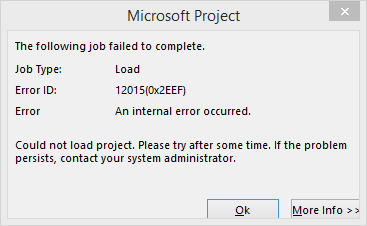
Got an error 12015 when opening Project Professional 2013. Clicking the More info and it shows this: <detail><ServerExecutionFault xmlns="http://Microsoft.Office.Project.Interfaces/" xmlns:i="http://www.w3.org/2001/XMLSchema-instance"><Actor i:nil="true"/><LastError>12015</LastError><Message/><Source/><StackTrace/><TargetSite i:nil="true"/><ExceptionDetails><errinfo xmlns=""><general><class name="ActiveCacheUnsupportedProjectProfessionalVersion"><error id="12015" name="ActiveCacheUnsupportedProjectProfessionalVersion" uid="315f3c6b-46fa-e411-80d9-00155d106504" version="15.0.4569.1504"/></class></general></errinfo></ExceptionDetails></ServerExecutionFault></detail> and the second error message is: According technet ( http://blogs.technet.com/b/p...
OWASP Top 10s

Web security is such a broad topic to talk about. There are numerous vulnerability scanning tools available these days that can check your application and provide comprehensive reports. While it is impossible to know what next attack on your site will be, we need to be ready to deal with any possibilities. One of the preparation steps is to review the top vulnerabilities learned from history. T he OWASP Top 10 provides a list of the 10 Most Critical Web Application Security Risks and for each Risk it provides: A description Example vulnerabilities Example attacks Guidance on how to avoid References to OWASP and other related resources